Freebestoffers


IndoBanner Exchanges

October 19, 2008

Adobe Photoshop - Building a Navigation Bar (2)

5. Make a Layer Group

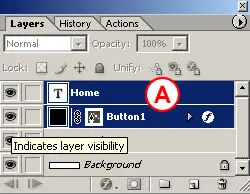
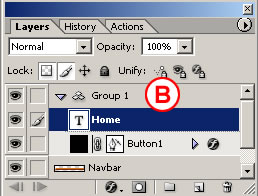
With the home type layer selected, hold the Shift key and click the button 1 layer in the Layers palette, so that both layers are selected A. Then choose Layer>Group Layers from the main menu bar. This gathers the two layers into a layer group labeled Group 1 B. Now that the button and text are grouped, it will be easy to duplicate them as a unit.
Make a Layer Group in ImageReady

Make a Layer Group in ImageReady

6. Make Duplicate Buttons

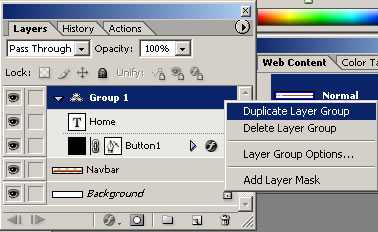
Duplicate button 1 along with its text by Control/right-clicking Group 1 in the Layers palette and choosing Duplicate Layer Group from the menu that appears in following image. You won't see the duplicate button in the image yet because it is located directly on top of the original button.
Duplicate Layer Group in ImageReady


TIP: Selecting Multiple Layers.

You can select more than one layer at a time-but only in ImageReady, not Photoshop. To select multiple layers, Shift-click if the layers are next to one another in the Layers palette; Command/Ctrl-click if they are not.
Select the Move tool, and make sure its Layer Select tool variation is highlighted in the Options bar. Click on the button in the image and drag to the right to move the duplicate button and its text B.

Notice the light blue lines that appear and disappear as you move the button C. These are Smart Guides-temporary alignment guides that display automatically when you move an object. Use them to align the buttons horizontally as you drag. Release the mouse when a vertical Smart Guide appears in between the two buttons, indicating that they are no longer overlapping.
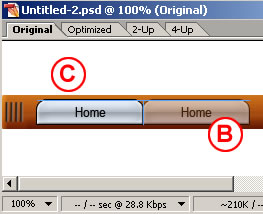
Selecting Multiple Layers in ImageReady

Layer Groups vs. Layer Sets.

ImageReady layer groups are similar to layer sets, but more useful for working with objects, because of the way layer groups react to the Move tool variations-the Layer Select tool and the Direct Select tool. If an object is on a layer that's included in a layer group, clicking on the object with the Layer Select tool selects the entire layer group, while clicking with the Direct Select tool selects only the layer. If an object is on a layer that's in a layer set, both tools select the layer, but not its set.

Repeat this step five more times until you have a total of seven layer groups and seven buttons, all displaying the label home D.
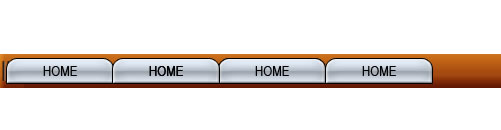
Duplicate Buttons in ImageReady

7. Change the Button Text

Select the Type tool and click and drag to highlight the word home on the second button from the left. Type the word Info instead. Repeat this step on each button, renaming the next five buttons: tours, stories, pictures, booking, and links.

Change the button text in ImageReady

8. Edit Multiple Layers at Once

You can save time by editing multiple layers together. Command/Ctrl-click on each of the seven type layers in the Layers palette to select them all A. Open the Character palette (Window>Character). With the Type tool selected, click the All Caps icon in the Character palette to make all the button labels uppercase.
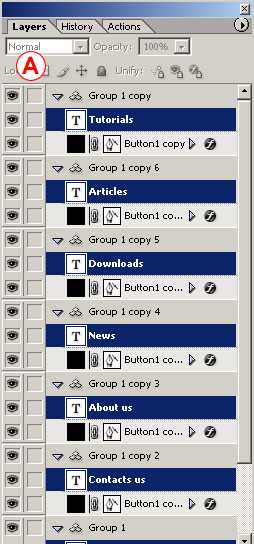
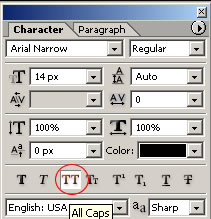
Edit multiple layers at once in ImageReady

Edit multiple layers at once in ImageReady

Note: Selecting a Type Layer. You must click directly on the word home to select the corresponding type layer so you replace that text. Otherwise you'll create a new type layer. If that happens, use the History palette to back up and try again.

9. Align Text to Buttons

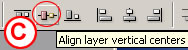
Now align each text label to its button. Start with the home button. Shift-click the home type layer and the button 1 layer to select them both in the Layers palette A. Select the Move tool in the Options bar. Click the Align Layer Horizontal Centers button to move the text to the horizontal center of the button B. Then click the Align Layer Vertical Centers button to move the text to the vertical center of the button C. Repeat this step on each of the six remaining pairs of button and text.
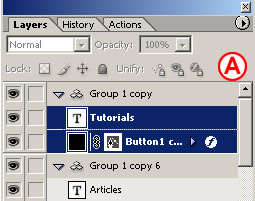

Align Text in ImageReady

Text Aligning in ImageReady

Show Transform Box in ImageReady

Complete Navigation Bar Created in ImageReady and Photoshop

Congratulations! You've created a navigation bar of matching buttons and text with a minimum of fuss. The file is still in PSD (Photoshop Document format), which is a good format in which to save the source file because it retains program features like layers. However, this image is not ready to upload to the Web, because Web browsers cannot display a PSD file. The file must first be converted to a Web-ready format, like JPEG or GIF.
(source: brainbell.com)
Adobe Photoshop - Building a Navigation Bar (1)

n this tutorial you'll learn a variety of techniques for creating visually exciting graphics that support and enhance navigation.

If you're not familiar with Photoshop then read this tutorial New file for the Web before working on this tutorial.

Navigation is the most important graphic element in a Web site. A good navigation scheme is one that is both easy to find on every page and easy to use. It communicates clearly and simply where the viewer is in the site, where she can go from that point, and how to get there.

Add a set of matching buttons to a navigation bar.

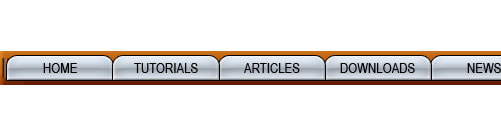
Final look of Navigation Bar

1. Switch to ImageReady

This navigation bar image was made in Photoshop to take advantage of Photoshop's wide range of image-editing features. You could continue to use Photoshop to add buttons to this bar, but we recommend you switch to ImageReady for that purpose to make use of ImageReady's exclusive object-oriented tools (the Tab Rectangle tool, Smart Guides, multiple layer selection, layer groups, Move tool variations, and more).

How to Switch to ImageReady

With the file open in Photoshop, click the Edit in ImageReady button at the bottom of the Photoshop toolbox. ImageReady launches, and the open file is automatically moved to ImageReady. You'll work in ImageReady for the rest of this project.

2. Create a Button Shape

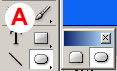
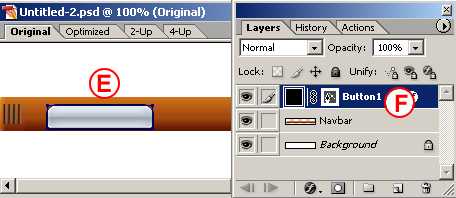
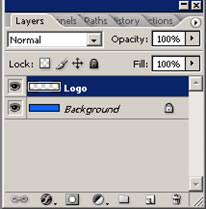
Start by creating one tab-shaped button. Select the Tab Rectangle tool in the ImageReady toolbox A. In the Options bar, make sure the Shape Layer icon is selected B. Set the button's size by checking Fixed Size and entering Width: 106 px and Height: 24 px C. Set the button's style by clicking the arrow on the Style field and choose Glass Table Cool style or just choose a different style. Select the Background layer in the Layers palette. Then click in the image to create a button on a new shape layer E. Give the layer a meaningful name by double-clicking Layer 1 and typing button 1 in its place F.

Tab Rectangle tool in the ImageReady toolbox to create a button

Tab Rectangle tool Optoin Bar to set the button properties

Create new layer for button


TIP: Turn Off Border.

You can hide the blue border that appears around your new button by choosing View>Show>Layer Edges.

3. Move the Button

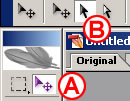
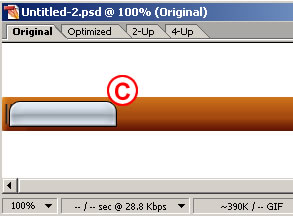
Now you'll turn the button upside down and hang it from the navigation bar. Select the Move Tool in the toolbox A, and make sure the Layer Select tool is highlighted in the Options bar B. This variation of the Move tool automatically selects the layer or layer group that contains the object you click on in the image. Click on the button you just made to automatically select the button 1 layer. Choose Edit>Transform>Flip Vertical to invert the button. Click and drag the button into position under the navigation bar's overhang C.

Move Tool in the ImageReady toolbox

Move the button using Move Tool in ImageReady

4. Add Button Text

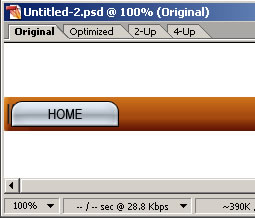
Select the Type tool in the ImageReady toolbox. In the Options bar, set Font Family to Arial Narrow or a similar font A, set Font Size to around 14 px B, and set Font Color to black C. Click on the button in the image and type home. This creates a new home type layer above the button 1 layer. Don't worry about where the text is positioned on the button for now.

Type Tool Option Bar in ImageReady

Type Tool in ImageReady

Write some text on button in ImageReady

(source: brainbell.com)
Starting a New File for the Web by Photoshop

When you create a navigation bar, a page layout, or any Web graphic from scratch, there are some important technical issues to consider up front-including image dimensions, resolution, color mode, and color profile.

You confront most of these issues right off the bat in Photoshop when you set up a new document. We help you unravel these technical mysteries here.

Image Dimensions

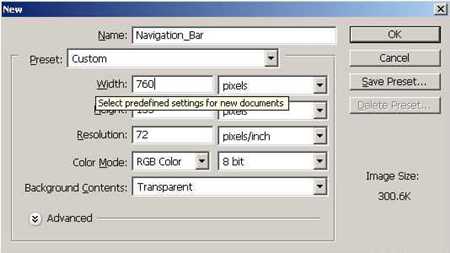
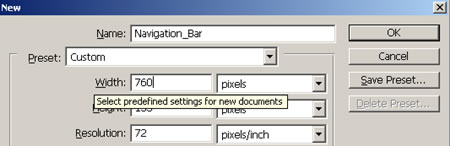
Adobe Photoshop New File

Files are measured in pixels when you design for the Web, but Photoshop's default for dialog boxes and rulers is set to inches. You can change inches to pixels throughout the program by choosing Photoshop/File>Preferences>Units & Rulers and setting the Rulers field to pixels.

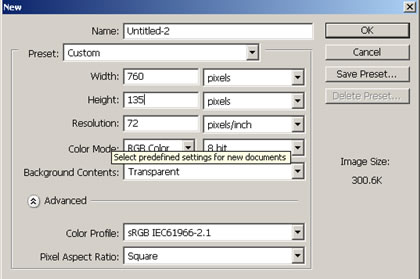
Choose File>New, and enter the Width and Height of a new Web file in pixels. A navigation bar or a page layout is best viewed without scrolling, so choose dimensions for those files that will fit within a typical browser window. Unfortunately, browser window sizes vary with each viewer's monitor display settings, choice of browser, and viewing behavior, so we can't give you one foolproof file size recommendation. Many designers make their navigation bars about 760 pixels wide and their page layouts 760 x 410 pixels, assuming that today's typical monitor is set to 800 x 600 pixels (or more) and accounting for scroll bars and other browser elements.

To be more accurate, do some research to determine the platform, display resolution, and browser that your particular audience is likely to use. Take a screen shot of an open Web browser in that setup, and crop away the browser interface elements to get a measurement in pixels of the area your viewers can see without scrolling. Use those numbers to custom size Web graphics for your audience.

Resolution

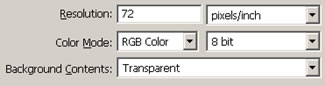
Adobe Photoshop New File Resolution Settings

Pixels are small rectangles of color information that are the building blocks of bitmapped images. Resolution, as that term is used in Photoshop's dialog boxes, describes the number of pixels per inch (ppi) in an image. If you take our advice in the previous panel and set the dimensions of a file destined for the Web in pixels rather than inches, it doesn't matter what number is in the Resolution field of the New dialog box. Photoshop will create a file with the number of pixels you dictate-without regard for pixels per inch-just as ImageReady does automatically.

However, if you leave the Width and Height fields in Photoshop's New dialog box set to inches, it's important to set the Resolution field to 72 ppi to approximate the resolution at which images are displayed in a Web browser on a standard screen. The same is true if you're resizing an existing image for use on the Web in Photoshop's Image Size dialog box.

Note that your Photoshop settings do not control the absolute size of an image on a viewer's screen. That depends on the display size of each viewer's monitor. For example, if a viewer changes her display from 800 x 600 to 1024 x 768, each pixel becomes smaller, making the same image look smaller on her screen.

Color Mode & Bit Depth

Adobe Photoshop New File Color Mode and Bit Depth Settings

Set Color Mode to RGB Color in Photoshop's New dialog box when you are creating a file for the Web. Web browsers cannot see files in any of the other color modes offered-Bitmap, Grayscale, CMYK Color, or Lab Color.

Color mode describes the set of available colors from which an image is built. Each pixel in an RGB file is composed of a combination of red, green, and blue color values.

Bit depth is the amount of color data in each channel of color (red, green, and blue). Leave Bit Depth set to 8 bit. This creates an image with 24 bits of color information (8 bits in each of the 3 channels of an RGB image), accommodating 16.7 million possible colors.

Background Contents

Adobe Photoshop New File Background Settings

Every new file begins with a single layer. The nature of that layer depends on how you set the Background Contents field in the New dialog box. If you choose Transparent, the first layer will be composed of transparent pixels represented by a gray and white checkerboard pattern and will be a regular layer. This is the best choice if you plan on optimizing the image as a transparent GIF through which you can see a Web page background.

If you choose either White or Background Color in the New dialog box, the first layer will be a special kind of layer called a Background layer. A Background layer acts differently than a regular layer. A Background layer cannot have transparent pixels and you can't change its opacity or move its contents. You also cannot place another layer below a Background layer in the Layers palette. All of these properties can make a Background layer difficult to work with.

If you do create a Background layer and later want to change it into a regular layer, choose Layer>New Layer from Background, or double-click the layer name and enter a new name in the Layer Properties dialog box.

Color Profile

Adobe Photoshop New File Color Profile Settings

Photoshop's color management system is designed to achieve consistency in the way colors in an image appear on screen and in print. Unfortunately, most Web browsers and a number of other applications used in a Web design workflow are not color-managed. So there is no sure-fire way to achieve consistency between the way colors appear on your screen in Photoshop and the way they will appear in each viewer's Web browser.

The best solution we've found is to design an image for the Web in the sRGB color space, so that it appears much the way it would in a Web browser on a typical Windows monitor. Then save the file without embedding a color profile, since profiles can't be read by most Web browsers and needlessly inflate the file size.

To do this, when you start a new Web file, click the Advanced arrow in Photoshop's New dialog box to reveal the Color Profile menu. Choose the sRGB profile from that menu. (Alternatively, choose Working RGB: sRGB if you've already set sRGB as your RGB working space in Photoshop's Color Settings.) If you save an optimized copy of the file in JPEG format, uncheck ICC Profile in Photoshop's Save for Web window or ImageReady's Optimize palette to avoid embedding the color profile.

(source: brainbell.com)
Computer Virus

A computer virus is a computer program that can copy itself and infect a computer without permission or knowledge of the user. The term "virus" is also commonly used, albeit erroneously, to refer to many different types of malware and adware programs. The original virus may modify the copies, or the copies may modify themselves, as occurs in a metamorphic virus. A virus can only spread from one computer to another when its host is taken to the uninfected computer, for instance by a user sending it over a network or the Internet, or by carrying it on a removable medium such as a floppy disk, CD, or USB drive. Meanwhile viruses can spread to other computers by infecting files on a network file system or a file system that is accessed by another computer. Viruses are sometimes confused with computer worms and Trojan horses. A worm can spread itself to other computers without needing to be transferred as part of a host, and a Trojan horse is a file that appears harmless. Worms and Trojans may cause harm to either a computer system's hosted data, functional performance, or networking throughput, when executed. In general, a worm does not actually harm either the system's hardware or software, while at least in theory, a Trojan's payload may be capable of almost any type of harm if executed. Some can't be seen when the program is not running, but as soon as the infected code is run, the Trojan horse kicks in. That is why it is so hard for people to find viruses and other malware themselves and why they have to use spyware programs and registry processors.

Most personal computers are now connected to the Internet and to local area networks, facilitating the spread of malicious code. Today's viruses may also take advantage of network services such as the World Wide Web, e-mail, Instant Messaging and file sharing systems to spread, blurring the line between viruses and worms. Furthermore, some sources use an alternative terminology in which a virus is any form of self-replicating malware.

Some malware is programmed to damage the computer by damaging programs, deleting files, or reformatting the hard disk. Other malware programs are not designed to do any damage, but simply replicate themselves and perhaps make their presence known by presenting text, video, or audio messages. Even these less sinister malware programs can create problems for the computer user. They typically take up computer memory used by legitimate programs. As a result, they often cause erratic behavior and can result in system crashes. In addition, much malware is bug-ridden, and these bugs may lead to system crashes and data loss. Many CiD programs are programs that have been downloaded by the user and pop up every so often. This results in slowing down of the computer, but it is also very difficult to find and stop the problem.

(wikipedia.org)

October 17, 2008

Affiliate Marketing Ebooks from Ebook-scene.com

If you are looking for a way to earn a bit of extra money -- or, in some instances, a significant amount of money -- you might want to consider dowloading an internet affiliate marketing ebook. There are many opportunities available to a person today that is interested in operating in the affiliate marketing business. Affiliate marketing techniques for the internet business are usually described in an ebook which you can download on your PC.

The primary consideration that you need to keep in mind when it comes to possibly participating in the Internet affiliate marketing business ebook is to make certain that any Internet marketing affiliate ebook you inject yourself with be entirely reputable.

There are a number of steps that you can take to ensure that you are dealing with a bona fide and reputable affiliate marketing ebook. First of all, in this regard, make certain that you are considering involving yourself with an affiliate ebook that has been in operation for an extended period of time. In this regard, by connecting yourself only with a more long standing ebook, you can be better assured that a particular affiliate marketing ebook is deemed reliable.

Second, another step that you need to take in ensuring the reliability and reputation of an affiliate marketing ebook is obtaining references and recommendations. Get as many references and recommendations as you reasonably can find. These can be very helpful to a person who is considering whether or not they are contemplating dealing with the Internet affiliate marketing business.

On the Internet there are now dozens of sites who can assist people in hooking up with reputable, reliable and profitable internet affiliate marketing business opportunities. Ebook-scene.com for example offers an excellent range of quality affiliate marketing ebooks. You might want to consider accessing sites like ebook-scene.com to make the right choice in finding quality affiliate marketing ebooks.

Ebook-scene.com is known for identifying and linking people up with a truly reputable and quality affiliate marketing ebooks.

By considering the pointers outlined in this brief article, you will be in a far better position to make sound and solid decisions regarding a particular affiliate marketing ebook that you may be considering to buy at this point in time. You can make certain that you make the right decision for you -- not only for your life today but into the future as well.


(Article written by Peter Vandenberg for ebook-scene.com)

Windows Vista Themes

The Windows Vista Themes allow people to be able to change the visual elements of the desktop area on their computer by selecting a theme that is stored on their computer. People can select which computer sounds they want on the computer desktop too, and some of the themes come with their own sound scheme.

The Microsoft Corporation website can provide directions that will help people apply a sound scheme on their computer desktop. To allow people ample opportunity to personalize their Vista experience, it is also possible to change any of the individual sounds on the computer so that every event has a unique sound attached to it. These sound changes will only apply to the personal settings of one user account on the computer.

All of the Windows Vista operating systems will includes two themes, and these themes can be changed out at any time. The two themes are the Windows Vista Themes and the Windows Classic Theme. The latter theme is very similar to the themes used in the earlier Windows operating systems.

Windows Vista users can download Windows Vista Themes from many software company websites. Some of these themes will be provided free of charge and many can must be purchased. Any Windows Vista Theme that is downloaded from an outside should be considered very carefully. A theme can be assigned to any person that has set up a user account on the Vista operating system.

It is possibly to change themes by opening the Theme Settings on the computer by using the Start Menu button. Vista users can click on the Control Panel, and select Appearance and Personalization button, and select Personalization to find the area marked Themes. The Windows Vista Theme can be selected and installed by selecting the Theme you want from the list in this section.

(Article Source: http://www.superfeature.com)

Tips : Don'T Wrong Write Down Credit Card Number

In this time, payment by using credit card done by theX many people. Many the shops sell its merchandise by using credit card. Not only in shops, expense through internet even also almost always his payment through credit card. Effect of progress of this technology, badness is even also start the storey.

Peoples start to exploit others credit card to do the payment a transaction. This clearly harm the people have the credit card.

In this time, payment by using credit card have to through otentication process. This process to prove that the credit card truely validate. Can also to know do his card is is blacked out or don't.

Otentication process this done by accessing the computer server from the credit card on-line. So thatly if the credit card have problem hence can direct known.

If expense us in internet and his payment by using credit card, usually we have to type number of credit card, name of owner of card, and date of lapsing. Typing of credit card number might possibly wrong, that good is intended and don't.

If happened mistake of typing [at] credit card number, it is of course process otentikasi to server become without effect. Transaction process surely will be refused, because the card number don't enlist at computer database server.

Clearly this will play around with the process. To avoid mistake at typist of credit card can be done by theX inspection of the card number.

How? All credit card numbers use the cheque digit. Of digit cheque this is, we can know what is enterred by theX credit card number correctness or wrong.

Way of Check Digit

Is that digit cheque? functioning Digit cheque to check do the data enterred the correctness or wrong. Usually number check this digit is added by the end of a[n enterred data.

Number check the digit obtained with a formula. By the data calculation enterred, hence obtained a number check the digit. This number will be added by the end of the data. If in a moment the data is utilized again and happened mistake of typing, calculation of number check the digit will get the different value. So that in early the mistake process have can be detected.

In implementation of of digit cheque used at credit card number (Visa Card, Master Card, Amex, JCB, and others), bank account number, goods code at swalayan shop or even at Nomor Induk Mahasiswa. Try to conceive if digit cheque is not applied at credit card. If happened mistake of typing of credit card number, hence don't immediately soybean cake. This matter can result his invoice will fall to others.

That way the things of at swalayan shop. If the wrong cashier enter the goods code, the goods as described at struk payment will differ. It is possible that this very harm for buyer or even for swlayan shop it self.

One of the way to look for the value check the digit is by using algorithm Luhn. Algorithm Luhn is one of used algorithm to yield the value check the digit. Some credit cards use this algorithm to yield the value check the the digit. In general, number at credit card consist of 16 number. extreme right number is assessing the digit cheque.

Thus the amount of the credit card numbers be in fact is merely 15 number. From to this 15 number can be searched for the value check his digit. Its way is every the number residing in anomalous on course (calculation of position from left to right) multiplied with number 2. If this multiplication result bigger than 9, his value is lessened 9.

Every even number on course multiplied with number 1. Result of from all this multiplications is accumulateed, so that get a value. This value is assumed as X. Later assessed X this added with the number in such a manner, so that the result of from the addition if/when modulus with number of 10 him result had to 0 (zero). Number is checking the digit.

Algorithm Luhn…

For example its is a credit card with number of 4699 2600 1144 1506. If we calculate 15 first number as according to formula of algorithm Luhn, hence him result as follows:

4 X 2 = 8, 6 X 1 = 6, 9 X 2 = 18 - 9 = 9, 9 X 1 = 9, 2 X 2 = 4, 6 X 1 = 6, 0 X 2 = 0, 0 X 1 = 0, 1 X 2 = 2, 1 X 1 = 1, 4 X 2 = 8, 4 X 1 = 4, 1 X 2 = 2, 5 X 1 = 5, and 0 X 2 = 0.

If that multiplication result is summed, him result is 64 ( 8 + 6 + 9 + 9 + 4 + 6 + 0 + 0 + 2 + 1 + 8 + 4 + 2 + 5 + 0). number of 64 this added a number so that when modulus with 10 would yield 0 (zero). Number is number 6. Because 64 + 6 = 70 then 70 modulus of 10 him result 0.

Now see the last number of the credit card number. Isn'T it true number 6? So, by this is we can check in early process what is the entering credit card number of correctness or wrong.

How if enterred card not true effect wrong type. For example is 4699 3600 1144 1506, hence his calculation result is: 4 X 2 = 8, 6 X 1 = 6, 9 X 2 = 18 - 9 = 9, 9 X 1 = 9, 3 X 2 = 6, 6 X 1 = 6, 0 X 2 = 0, 0 X 1 = 0, 1 X 2 = 2, 1 X 1 = 1, 4 X 2 = 8, 4 X 1 = 4, 1 X 2 = 2, 5 X 1 = 5, 0 X 2 = 0, and 6 X 1 = 6. Value check the digit figured in in this calculation. Quantifying result the obtained is 72. If number of 72 this modulus with 10 hence him result unlike 0 (zero). This means that the credit card number not true. Thereby, we can check what is a[n number of that credit card have ever been correct or don't.

By the way, caw is be Alogarithm SDSB yach...? ? ?

Way Hacker Steal Of Credit Card Data

This article is not addressed to teach the you how do stealing the credit card data, but we wish to inform the you so that later you can avoid from badness of theft of credit card data. Term badness of ordinary credit card in term " carding" since existence of internet mount hundreds of [gratuity/ %]. Ironically Indonesia enter in overall top 10 ( have time to in first grade) so that derivative credit card banks in Indonesia refused when online expense in site abroad.
This matter also have in experiencing of by the writer wishing subscribe to the magazine game abroad with online payment pass the credit card.

hackers aspire after once the is badness of this one, why? Because if only hack website or deface (change the appearance or link website) is something there no his profit. And this matter can to detecting and arsonist can be caught easily if sites which his enter to have TRACKER (the program trace ip/link) or LOG FILE (the file note the activity user/ip which step into website). If carding they can free without footstep as well as sometime after getting his data, they propagate between hacker hard so that traced by theX the first person steal the credit card data. Occurence is recently that is site of internet Indonesia terrorist is also in register from result carding.

There are some the ways used by hacker in stealing the credit card, for example:
1. Sniffer package, way of this is quickest way to get the data any kind of do. Activity concept of them is enough wear the program able to see or make logging file of the data sent by website e-commerce (online sale) which they set eye on. In general they set eye on website the is not equiped security encryption or site the don't have security the goodness.

2. Make the spyware program, trojan, worm and of a kind functioning him be like keylogger ( keyboard logger, program note activity of keyboard) and this program is disseminated by E-mail Spamming (put his file in attachment), mirc (chatting), messenger (yahoo, MSN), or sites selected with icon the interestingness netter to downloaded and open the files. This program will note all your computer activities into a file, and will send it to enamel hacker. Sometime this program can be run direct if you step into site which in making hacker or pornography site.

3. Make a phising site, that is site of a kind or looked to be the same as him site genuiness. example in Indonesia at the time click bca site (http://www.klikbca.com), have experienced of the same thing. the site of his appearance is same as klikbca but his address is made some different be like http://www.clikbca.com, http://www.kikbca.com, etc, become if netter the wrongness type, they will lost to that site. Profit of the people make a site, say don't in bad faith. So if hacker carding which make that site, in act to your credit card will leak.

4. Leak situs e-commerce is direct and steal all data his customer or client's. This way rather difficult and require to expert hacker or hacker experience which have to do so. In general they wear the injection method (input script able to be run by site/server) for site owning firewall. There are some ways injection for example used occasionally html injection and SQL injection. For the site don't have security or firewall, in act to fad.

There are some ways is again done by hacker, but the way of above is the way is most commonly done hacker to carding. "Badness don't only happened caused by intention from the perpetrator, but caused by opportunity, allerts... and allerts..."

(Writer: erwin@ketok.com (http://www.ketok.com) [meagerly changes])

October 16, 2008

10 Ways to Save Time While Building a Website

As a freelance web developer, time is money. I use many different tricks to increase my productivity and these are my top selections for saving time.

Drop Down Menus :: All Web Menus (http://www.likno.com/allwebmenusinfo.html )
Whenever I need to add a complex drop-down menu to a site, I turn to All Web Menus. This program styles a complex multi level menu in less time then it takes to type the text. All websites need menus and for detailed menus, you should try All Web Menus.

Time saved: 1 Hour per menu.

Image Capture :: Gadwin Printscreen (http://www.gadwin.com/printscreen/)
Gadwin Printscreen utility replaces windows standard printscreen keyboard button with more options and flexibility. It loads on windows startup and runs silently in the background without consuming system resources but it’s always there when you need it. Instead of just capturing the entire screen view, Gadwin allows you to select a rectangular area very precisely with the help of a built in magnifying window. This tool is invaluable to my work. I often use it to grab different pieces to mock up a design.

Time saved: 2 Minutes per screen capture.

Batch Image Resizing :: Multiple Image Resizer .NET (http://www.multipleimageresizer.net/ )
I tried 10-15 different batch resizing programs before setting on Multiple Image Resizer .NET. This program’s ease of use in unparalleled and it has absolutely any function you could desire. Simply select a folder of images you want resized, determine whether to resize, add border, add text, overlay images, crop, rotate or flip them as a whole and save time editing the images one by one. I often use it to add small watermarks to a group of images I’m uploading to a clients website.

Time saved: 20 Minutes for a group of 20 images to an hour or more for a group of 100+.

Web Forms :: My Contact Form (http://www.mycontactform.com)
Web forms take time to build, time to style and time to test. I use My Contact Form because it offers all of these steps in one plus more options then I can easily code. The forms are highly customizable including things like adding attachments, multiple recipients, selecting a recipient and complete control over the look of the form.

Time saved: 30 Minutes to 1 hour per form.

CSS Text Boxes :: Rounded Cornr (http://www.roundedcornr.com/)
Once you have your rough draft laid out in CSS, and you need to start adding style, Rounded Cornr can save you a lot of time. Rounded Cornr quickly and easily creates images and CSS code for different box styles in an easy to use interface. It also offers an option to code it using only one image for all four corners, saving a minimal amount of bandwidth.

Time Saved: 10 Minutes per style.

Vectorizing Images :: Vector Magic (http://vectormagic.com/)
A lot of the time, I’m designing images using Photoshop. I do all of my logo work in Illustrator but I often find the need to convert another one of my designs to a vector so I can resize it without a reduction in quality. Vector Magic is a free online service that does this amazingly well. I was skeptical at first, but after answering a few short questions about my image, they were able to create a high quality vector image from my jpeg. Doing it by hand for complex images would take a lot of time and not turn out quite as precise.

Time Saved: 1-3 Hours per complex vector.

Selecting Color Schemes :: Adobe Kuler (http://kuler.adobe.com/)
This is one site you’ve probably heard of before, but I find it easier to use and with more advanced features then the other color scheme utilities available online. Add Adobe Air and use this tool even when you’re not connect to the internet. Kuler offers many premade color schemes as well that are an excellent source of inspiration for your website.

Time Saved: 5-10 Minutes per scheme over self-selection.

Creating a Patterned Background :: Stripe Generator (http://www.stripegenerator.com/)
A simple patterned background can add a much needed professional finish to your websites. Sometimes, if a site of mine is looking amateur despite clean design, all I need to add is a touch of design to the background. Stripe Generator, as it’s name implies, auto generates a striped background based on your input criteria. You can change all the colors and create a wide variety of non-distracting backgrounds.

Time Saved: 15 Minutes over creating it manually.

Building a Quick Photo Gallery :: Flickr Slidr (http://flickrslidr.com/)
First off, I’m partial to Thickbox, but it isn’t always the easiest to configure exactly as you like and can require use of other programs like the Multiple Image Resizer. Flickr Slidr creates a user controlled photo slideshow that pulls the pictures directly from your Flickr account. You can create a separate account for each project and spend much less time editing the look of the already well-designed gallery.

Time Saved: 25 Minutes over Thickbox.

Testing Your Website in Multiple Browsers :: Browser Shots (http://browsershots.org/)
It’s extremely important that your websites look good on all browsers (or at a minimum, all widely used ones). Most people don’t have very many browsers installed on their computer and even if they did, the time it would take to open your site in each browser would be huge. That’s where Browser Shots comes in. Put in your URL and choose all the browsers you liked to test for. Over 50 browsers are currently supported and you can even specify different screen sizes. Browser Shots then shows you a screenshot of what your website looks like in each browser.

Time Saved: 1-2 Hours if you choose all the browsers.

Do you want to measure from your monitor?

Today I found a site which has been very useful for me.

I wanted to measure a small box but couldn’t find a tape measure or ruler.So i searched something to help me from the internet.

Screen-o-Meter is a site that allows you to measure things online with your monitor’s screen. All you need to know is the size of the screen your monitor has.The site is set up to work with TFT and LCD monitors, but with some adjustments, you can use it with a CRT monitor as well.

To begin measuring, set the monitor screen size. Choose the correct one from the drop down box on the right hand side of the page.

Next, select how long you want the Screen-o-Meter to be. Then click on the Let’s See button. That will take you to the page where your ruler will load.

On the Measurement page, you can test it to see if it’s accurate. You’ll put in your screen size and then click on the Check button. When the page loads, there will be a large orange circle. If a CD or DVD fits in the circle perfectly, you know you are calibrated right and you’re getting precise measurements.

Back on the main page, under the Main Measurement field, you’ll see a link for a rectangular ruler. That’s how you would measure envelopes and such. You just put in the dimensions you’re trying to get and it makes a ruler for it. For example, you could do 3×5, 5×7, 8×11, etc.

I hope this site helps you also.

http://som_en.showdown.hu/

New HP TouchSmart IQ800 PC unveiled

Feature highlights of the IQ800 include resolution of 1,920 x 1,200 pixel touch screen and a slot-load Blu-ray player.
Other features of the IQ800 include Intel Core 2 Duo processor, integrated webcam, colored HP Ambient Light and media card reader.

The HP TouchSmart IQ804 PC starts at $1,899 and is expected to be available Sept. 21st, while the HP TouchSmart IQ816 PC starts at $2,099 and is expected to be available Oct. 12th.
Via the HP TouchSmart site.

(written : togi)

Create PDF Files for Free

One of the easiest ways to document web pages and other printable content is to "print" them into a PDF file. Adobe's Acrobat program provides a printer driver to create such files from anything that you can print.

Of course, Acrobat is out of reach for many people, or at least, we don't have any desire for the program once we find that the price is $250 for Acrobat Standard or $400 for Acrobat Professional.

Fortunately, there are some cheaper options.

I've used the program Click2PDF ,(Click2PDF review) for about six years and been very happy with it. Click2PDF allows me to print multiple times, even from multiple programs, change the order of the "prints" and then save the resulting PDF file. If I don't like any of those prints, I can uncheck them and print again. My main use for Click2PDF is to document purchases on the 'Net.

I've recently found a free, open-source program called PDFCreator. It still hasn't quite made the version 1.0 release yet, but has a lot of nice features. PDFCreator is licensed under the GNU Public License.

Like Click2PDF and most of the other PDF creation programs, PDFCreator installs as a pseudo-printer. To use it, you just click on a print icon or File > Print from a program's menu bar.

There's an optional advertising toolbar included in PDFCreator. I chose to uncheck the toolbar option during the installation (it is selected/checked by default).

Altough PDFCreator will let you print multiple documents and let you change the order of items to be saved in the file, the version I installed (v0.9.5) was unable to save these items. Further, it wanted to save them in .ps (PostScript) format rather than .pdf (Portable Document Format).

Bottom line: It's an interesting program and is planned to do the functions I need, but isn't quite there, yet. I'll use it on my desktop, but stay with Click2PDF on my notebook. My notebook is my primary computer.

You can get the latest version of PDFCreator at its home at http://sourceforge.net/projects/pdfcreator/.

(terryscomputertips.com)

Windows XP Scree Freezing

Reader Steve Sturgill wrote to ask about screen freeze problems he was having:

Mr. Stockdale, My OS is XP, my ISP is MSN and I connect through broadband. My problem is, any time I right click, as in attempting to access dropdown menus, my screen freezes. Also I am unable to click on any of the tools in the top, left corner of my screen - i.e. File, Edit, View, etc. This has been going on for several weeks! I have looked extensively for a solution online - to no avail. Several sites suggest using a program called ShellExView, which I downloaded and tried, several times, in vain. Nothing seems to work. Can you please advise me? Any and all suggestions would be greatly appreciated. Thanks very much, in advance, Steve

I wrote back to Steve to suggest some actions to try to resolve his problems.

I've seen some strange effects like that before - not those exactly (except the apparent freezing on right-clicking for a context menu).

I have had that freezing problem and it turned out to be my hard drive going bad. When it freezes, check the hard drive light on your computer and see if it's showing activity. In my case, Windows was having trouble reading some sectors and was trying over and over and over....

My solution, unfortunately it turned out only to be a temporary solution, was to use Spinrite 6 from Gibson Research to do a low-level repair of the drive. Unfortunately, two months later, the problem was back. I wrote about it in my article www.terryscomputertips.com/computers/second-hard -drive-failure .php

You can get some strange effects from malware. You might try installing CounterSpy, which is free for 15 days.

Also, try a online virus scan from a different company than does your antivirus program - that is, if you use Norton Antivirus, use Trend Micro's online antivirus scanner. If you use Trend Micro's antivirus, use Panda Software's online antivirus scanner. These scans will take several hours or overnight.

Finally, if you do not have a router, add another level of protection to your system by using a cable/dsl router to prevent connections to your computer from being initiated from other computers on the Interent.

THANK YOU SO MUCH SIR, for such a prompt reply. I really didn't even expect one from someone as busy as yourself. My AV is NOD32, which runs daily and has declared me virus free. I tried Counterspy already, to no avail. My hard drives are both < six mos. old, and I use SeaTools for Windows to verify their integrity. I use a router (provided by my cable co.). Once again, thank you very much for your help and suggestions. I may have no other recourse but to completely reinstall everything. God bless you sir.
- Steve

(terryscomputertips.com)

The Basics of General Computer and Information Sciences

Businesses and corporations are looking for professionals who are able to solve technical and computer related problems while putting their skills to work creating new technology and efficient means of progress. The field is competitive and demands motivation and quick mental reflexes. Professionals are also expected to work under pressure and communicate with other employees to work on team projects or write reports. Professionals in the computer and information sciences field work out problems, maintain and develop systems, and have the freedom to work in several other types of employment.

According to the U.S. Bureau of Labor Statistics (BLS), www.bls.gov, most employers look for people with a formal education or work experience. There are a few positions that may not require a four-year degree, but they are hard to come by. Also, if a person wants to advance in their career, having a master's degree and management skills may be beneficial.

(educational-portal.com)

Information about Computer Sciences

The highly competitive field of computer science is constantly evolving with new innovations and breakthroughs occurring on a daily basis. Students in the field are being exposed to new possibilities and limitless job opportunities as advancements in technology dictate a growing need for educated professionals. Concentrations within the field of computer sciences include web page and digital design, systems analysis, networking and telecommunications, programming, and software applications.

There are also many educational opportunities for people interested in pursuing computer science as a field of study. According to the U.S. Bureau of Labor Statistics (BLS), www.bls.gov, while a variety of educational backgrounds are acceptable, more and more employers are seeking out candidates with advanced education, such as a bachelor's or a master's degree. But, all hope is not lost for those without these advanced degrees. The BLS notes that there are many community colleges, technical institutes and proprietary schools that offer certification and associate degree programs for the computer sciences. These alternate education programs may offer more specific training and knowledge than a four-year program.

(education-portal.com)